What is CPQ and how does it work? Learn how Configure, Price, Quote (CPQ) tools streamline pricing and quoting workflows for B2B SaaS companies.
Jump to read:
What Is CPQ? (Configure, Price, Quote Explained)
Why CPQ Matters for Modern B2B SaaS Companies
How CPQ Software Works (Step-by-Step)
CPQ for Subscription-Based Businesses
The Limitations of Standalone CPQ
Key CPQ Features to Look For (Especially for Subscription Businesses)
CPQ Implementation Considerations (and Common Pitfalls to Avoid)
Why Younium Is Built for Modern B2B SaaS
CPQ vs Quote-to-Cash: What’s the Difference?
FAQ
Ready to Scale Your Subscription Business?
Short for Configure, Price, Quote, CPQ helps sales teams create accurate quotes quickly. This is true even for dynamic pricing and usage-based billing.
Selling complex products in a subscription-based business isn’t simple.
Pricing may change based on usage, contracts, or customer needs. Additionally, you must manage customer preferences, pricing models, and product configurations. All this, while trying to close deals fast.
If you’ve ever asked, “What is CPQ?” you’re not alone.
In this guide, we’ll explain what CPQ is and how it works. You’ll learn how CPQ software supports the entire sales process.
Plus, you'll see how it enhances customer experience and integrates into the quote-to-cash process. We’ll also discuss what to consider when choosing a CPQ solution.
Let’s begin with the basics.
What Is CPQ? (Configure, Price, Quote Explained)
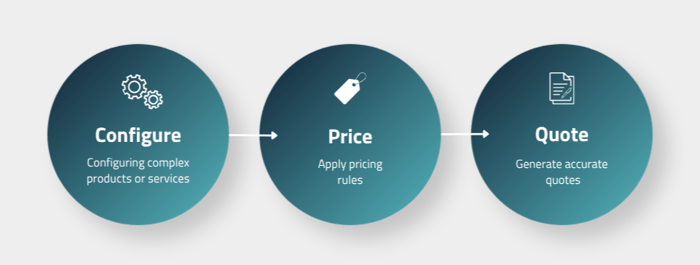
CPQ stands for Configure, Price, Quote. It’s both a process and a type of software, and it’s worth understanding the difference between the two.
As a process, CPQ helps sales reps configure products, apply pricing rules, and generate accurate quotes quickly. While it can be done manually, the process is bound to be slow, inconsistent, and prone to error.
In the sales cycle, CPQ sits between the initial customer inquiry and the contract stage. It takes over once a prospect is qualified and a sales rep is ready to put together an offer. From there, an approved quote feeds directly into the next stage, which consists of contract, billing, and subscription management.
As software, CPQ automates that same process and improves sales efficiency. It gives sales teams a system built on predefined rules for product configurations, pricing calculations, and quote generation.
Modern CPQ solutions often connect with customer relationship management (CRM) and enterprise resource planning (ERP) systems. These CPQ integrations ensure customer data flows smoothly across the entire sales process.
Reps can then follow a clear, rule-based workflow that produces accurate quotes every time, instead of relying on spreadsheets or memory.
Let’s break down the three parts of the Configure, Price, Quote CPQ process.
Configure (Product Configuration Process)
This is where a sales rep builds the right solution based on customer specifications. The CPQ system presents the available products, add-ons, or plans, and guides the rep through valid combinations.
Configuration rules sit in the background. They make sure a rep can’t accidentally quote a product bundle that doesn’t work or a plan that doesn’t exist. If you have complex products or a large product catalog, this step alone saves significant time.
Price (Applying Pricing Logic)
Once the configuration is set, the CPQ system automatically applies pricing logic. It pulls in the right pricing model for that customer using predefined rules. These can be flat-rate, volume pricing, tiered pricing, usage-based pricing, or custom pricing.
It also applies any approved discounts. The result is accurate pricing, calculated in seconds, without the customer rep having to do manual math or guess at numbers. This ensures consistent and error-free pricing throughout the sales process.
Quote (Quote Generation Process)
The final step is creating and sending the quote. The CPQ system generates a clean, professional proposal using approved templates and the pricing and configuration details already built in.
The quote then moves through an approval workflow. Here, it’s routed to the right person based on deal size or discount level, before it goes to the customer. There’s no need for email chains or waiting for someone to check a spreadsheet.
Also Read:
Why CPQ Matters for Modern B2B SaaS Companies
Manual quoting can work when the deal volume is low. But as a B2B SaaS company grows, problems appear fast. Subscription pricing, usage billing, and custom contracts add layers of complexity.
Without the right system, even strong sales teams struggle to stay accurate and efficient. Here are the main reasons companies turn to CPQ solutions:
- Pricing Gets Complex Fast: SaaS pricing is rarely simple. You must handle subscriptions, usage, volume discounts, and custom deals. Without CPQ, it’s easy to make mistakes or send inconsistent quotes. This creates confusion for both sales teams and customers.
- Manual Work Slows Everything Down: Every manual step adds risk. A small mistake, like a wrong number, can delay a deal. Teams must then fix errors through back-and-forth emails. This slows the sales cycle and reduces overall productivity.
- Spreadsheets Don’t Scale Well: Many teams still use spreadsheets to manage pricing. These tools break down as pricing becomes more complex. One wrong formula can affect the whole quote. Often, errors are not caught until it’s too late.
- Lack of Clear Audit Trails: Finance and legal teams need full visibility into quotes. They must know that pricing rules are followed every time. Without CPQ, there’s no reliable record of changes. This creates risk during audits, reviews, or funding rounds.
- Growth Becomes Hard to Manage: What works for a small team won’t work at scale. Manual processes cannot support high deal volume. CPQ creates a repeatable system that grows with the business. It helps teams handle more deals without adding extra admin work.
- Manual Approvals Cause Delays: Deals often slow down while waiting for approval. Quotes can sit in inboxes with no clear next step. CPQ tools fix this by routing approvals automatically. This keeps deals moving and reduces the chance of losing momentum.
- Revenue Can Slip Through the Cracks: Missed charges are more common than teams think. Add-ons, discounts, or usage fees may not be included. These small gaps add up over time. CPQ helps prevent this by enforcing pricing rules and automation.
CPQ isn’t just for new deals. Subscription businesses need accurate quotes across the full customer lifecycle. This includes renewals, upgrades, downgrades, and expansions.
A CPQ tool that only handles new sales leaves a major gap. In SaaS or subscription businesses, quoting is not a one-time task. It continues for as long as the customer stays with you.
Also Read:
- Subscription Management Tools B2B Finance Teams Should Know
- Maxio Alternatives for Subscription Management
How CPQ Software Works (Step-by-Step)
CPQ software helps sales teams move from product selection to deal closure with fewer errors and faster turnaround. Here’s how the CPQ process unfolds in a modern B2B SaaS environment:
Step 1: Product and Subscription Configuration
The process starts with building the right offer for the customer. Instead of browsing a price list or asking the product team, sales reps work inside the CPQ platform’s product catalog.
The system guides them through available plans, add-ons, bundles, and contract terms. At the same time, it enforces configuration rules in the background.
Those rules matter. They prevent invalid combinations, like pairing an add-on with an incompatible base plan, before the quote ever leaves your screen.
For businesses with complex products or multiple subscription pricing tiers, this step alone eliminates a huge source of back-and-forth. Here’s what you can expect:
- Plans and Tiers: Reps select from pre-approved subscription plans, including any usage-based or hybrid options
- Add-Ons and Bundles: The system shows only the add-ons compatible with the chosen plan, preventing misconfigurations
- Contract Terms: Length, billing frequency, start date, and subscription renewal conditions are set here, not assumed later
This step ensures every quote starts with accurate product configurations that match customer specifications.
Step 2: Pricing Logic Application
Once the configuration is locked in, the CPQ system applies pricing rules automatically.
There’s no manual math. The pricing engine pulls from a centralised set of rules that Finance and RevOps teams control. This ensures every rep is working from the same, up-to-date pricing logic.
This is where complex pricing models are handled cleanly:
- Tiered and Volume Pricing: The system calculates the right price based on quantity or usage thresholds (reps don’t need to know the thresholds by heart)
- Usage-Based Fees: For consumption-based products, estimated or committed usage is factored into the quote at this stage
- Proration: Mid-cycle starts, upgrades, or co-terming scenarios are calculated automatically, no spreadsheets needed
- Multi-Currency Support: For international deals, the CPQ system applies the correct currency and exchange rules
- Discount Governance: Discounts are subject to role-based limits to protect margins (reps might be able to offer up to 10% without approval, but anything above triggers an escalation)
As a result of this step, sales teams can manage subscriptions and pricing without guesswork, ensuring accuracy and fewer pricing errors.
Step 3: Approval Workflow
Before a quote reaches the customer, it may require internal approvals depending on deal complexity. In a manual sales process, this means emails, Slack messages, and waiting.
CPQ software eliminates that entirely. Approval routing is automated based on predefined rules, typically a combination of:
- Deal Size: Larger deals route to senior approvers automatically
- Discount Level: Quotes with discounts above a set threshold require sign-off before they can be sent
- Product Mix: Certain configurations, like bundled enterprise plans or non-standard contract terms, may require a specific team’s review
The rep doesn’t have to chase anyone. The system knows who needs to approve what, and routes the quote accordingly. Approvers get a notification, review the quote in the CPQ platform, and approve or flag it — all in one place.
Also Read:
Step 4: Quote Generation
With approvals in place, the CPQ system generates the customer-facing proposal. This isn’t a blank document that the rep fills in manually.
It’s actually a polished, branded quote built from a pre-approved template, populated with the exact configuration and pricing from the previous steps. Here’s what you can expect:
- Customizable Templates: Teams can maintain different templates for different deal types, customer segments, or pricing strategies. All these are on-brand and pre-approved.
- Accuracy and Consistency: The quote pulls directly from the configuration and pricing steps. Therefore, there’s no risk of the document contradicting what was agreed internally.
- Fast Process: What used to take hours of formatting, double-checking, and PDF-converting takes minutes. Sales teams spend that time on selling, not document production.
By providing a professional presentation and helping sales reps respond faster, CPQ platforms significantly improve the customer experience.
Step 5: Deal Closure and Handoff
This is where the quote becomes a deal — and where good CPQ integration pays off most.
Once the quote is ready, it’s sent directly to the customer through the CPQ platform. Most modern CPQ solutions support e-signature at this stage, allowing customers to review and sign the contract digitally without switching tools.
Some platforms also handle basic contract management here. This includes storing the signed document, capturing agreed terms, and creating a record that both Sales and Finance can reference.
After the signature, the real handoff begins:
- CRM Sync: Customer data and opportunity details, pulled from CRM systems like HubSpot or Salesforce at the start of the quote, are updated automatically. No re-entry, no data mismatch.
- Billing System Handoff: The agreed pricing, contract terms, and subscription details flow directly into the billing system. This is a critical link. If this handoff is manual, it’s where pricing errors and revenue leakage begin.
- ERP Integration: For businesses using ERP systems for fulfilment, order data is pushed automatically once the order is closed. Finance and Ops teams get what they need without waiting for Sales to send a summary email.
Done well, this final step means the entire sales process runs without anyone manually copying data from one system to another. From initial customer inquiry to active subscription and first invoice, it ensures clean data flows across CRM and ERP systems.
Also Read:
- Top Recurly Alternatives and Competitors
- Your Legacy Billing System Is Costing You More Than You Think
CPQ for Subscription-Based Businesses
Most CPQ software was built with a transactional sale in mind. You configure a product, set a price, send a quote, and close the deal. Done.
But subscription businesses don’t work that way. The deal doesn’t end at the signature: it’s just getting started. That changes what CPQ needs to do, and how much it needs to connect to the rest of your revenue stack.
Here’s what makes quoting for subscription businesses genuinely different.
Recurring Revenue Raises the Stakes
In a one-time sale, a pricing mistake costs you on that deal. In a subscription business, that same mistake repeats on every invoice for the life of the contract.
A discount applied incorrectly in the quote stage could mean undercharging a customer for 12 or 24 months before anyone notices. Keep in mind:
- Incorrect pricing reduces long-term revenue growth
- Fixing the error later can damage customer relationships
Every quote isn’t merely a proposal. It’s a template for how that customer will be billed, potentially for years.
Renewal Quoting Requires Speed and Accuracy
Renewals are where subscription revenue is won or lost. But many CPQ tools treat them as an afterthought.
A subscription business needs its CPQ solution to proactively surface upcoming renewals and generate renewal quotes automatically. This tool should also apply any updated pricing or terms without you having to start from scratch each time.
Without this capability, subscription renewals become a manual scramble, and sales teams miss windows, which may lead to your customers churning quietly. What’s more, your finance department may end up having no visibility until it’s too late.
Subscription Pricing Models Are More Complex
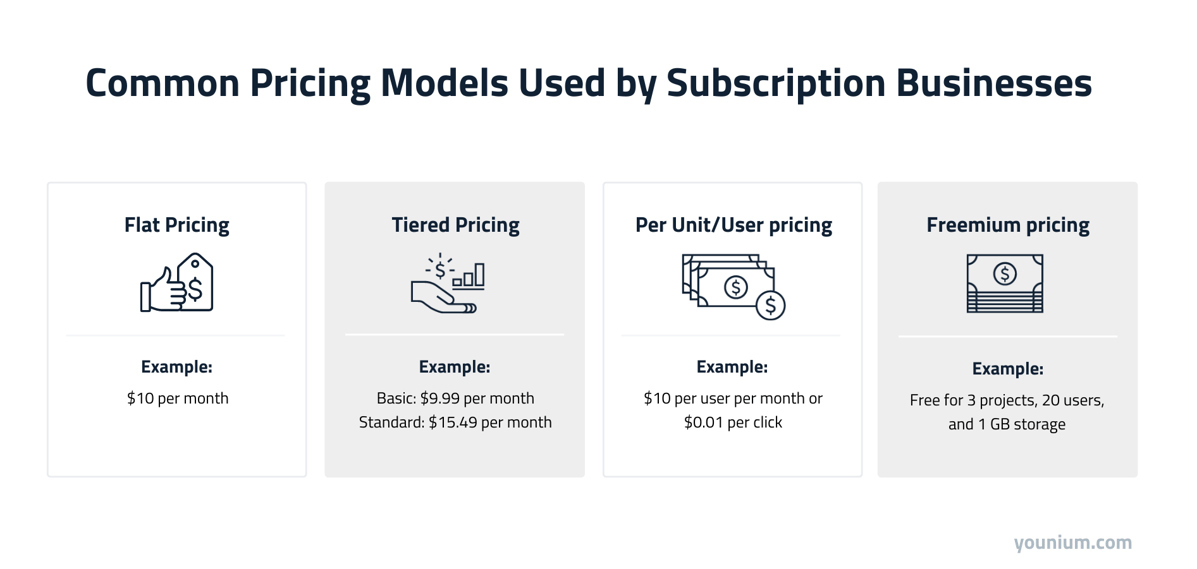
A traditional sales quote might cover a single product at a fixed price. Subscription pricing rarely works that way. There could be multi-period contracts with different billing frequencies, for instance. A single deal might combine:
- A flat-rate base plan
- Seat-based pricing that scales with headcount
- A usage-based billing component for consumption above a threshold
- Negotiated custom pricing for specific contract terms
- Add-ons, bundles, and custom configurations
- One-time setup fees
A CPQ system needs to handle all of these cleanly and in a single quote, without requiring the sales rep to manually calculate each component.
Without that capability, complex pricing models become a source of quoting errors, rather than a competitive advantage.
Also Read:
- How to Buy a Subscription Management & Billing Platform (Finance Buyer’s Guide)
- Freebasing Revenue Operations With CPQ? Why You Need an End-to-End Revenue Foundation
Contract Terms Must Flow Into Billing Systems
This is one of the most important, and most overlooked, connections in the subscription revenue stack.
The terms agreed in a quote: pricing, billing frequency, start date, discounts, and contract length, need to flow directly into the billing system. If they don’t, someone has to manually re-enter them. That’s where things go wrong.
Disconnected systems create billing errors, delayed invoices, and revenue leakage that’s hard to trace back to its source. That’s why the CPQ process and billing system for subscription management need to be one connected workflow.
Mid-Cycle Changes Are the Norm
Subscription customers don’t stay static. They upgrade, downgrade, add seats, remove features, and renegotiate terms, often mid-contract.
Each of those changes requires a new or amended quote, complete with accurate proration and updated billing terms. For a CPQ solution to serve a subscription business properly, it needs to handle the full quoting lifecycle. That includes:
- Upgrades and Expansions: Quoting additional seats, higher tiers, or new add-ons for an existing customer
- Downgrades and Amendments: Adjusting terms mid-cycle without breaking the billing schedule
- Co-Terming: Aligning new additions to an existing contract end date, with correct proration
If your CPQ tool can only quote new deals, it’s covering a fraction of your actual quoting volume.
Usage-Based Pricing Adds Complexity
/3.%20Illustrations%20(2025)/Usage%20based.png?width=700&height=304&name=Usage%20based.png)
Usage-based billing is growing fast across B2B SaaS. While flexible for customers and powerful for revenue growth, it complicates the quoting process considerably.
A quote that includes usage-based components needs to account for committed minimums, overage tiers, and estimated consumption. Getting that wrong at the quote stage means billing disputes later.
CPQ tools that can’t support pricing logic tied to usage metrics, or which weren’t built with usage-based models in mind, tend to struggle. This is a key capability to verify when evaluating any CPQ platform.
This is exactly why solutions like Younium take a different approach to CPQ. Many CPQ tools stop once the quote is created. Younium, however, connects the entire journey, from product setup, pricing, subscriptions, billing, and financial reporting, in one platform.
For B2B SaaS businesses managing recurring revenue, that means the quote doesn’t just close a deal. It kicks off a fully connected revenue process, from the first invoice through to renewal.
Also Read:
- Usage-Based Pricing: What it Is and How to Implement it
- The Reality of Usage-Based Pricing: Challenges, Opportunities, and How Younium Can Help
The Limitations of Standalone CPQ
CPQ software plays a key role in the sales process. It helps sales teams configure products, apply pricing rules, and generate accurate quotes. But many CPQ tools stop short of supporting what happens after the deal closes.
This creates gaps across the quote-to-cash process, especially for subscription-based businesses. Below are some of the most common limitations of traditional CPQ solutions:
- CPQ Stops at the Signature: Most CPQ systems focus on closing deals, not managing what comes next. They don’t handle subscription lifecycle events, billing schedules, invoice generation, or revenue recognition. This leaves finance teams to pick up where sales tools stop.
- Disconnected Systems Create Manual Rework: When CRM systems, CPQ tools, billing systems, and ERP systems are separate, teams must re-enter the same data multiple times. Contract terms, pricing models, and customer data often get copied manually. That’s where errors and delays pile up.
- Revenue Leakage Between Quote and Invoice: If billing systems don’t inherit pricing logic directly from the CPQ process, mistakes happen. Discounts, usage terms, or contract details may not carry over correctly. This leads to overcharges, undercharges, and lost trust with customers.
- The Over-Customization Trap: Some CPQ implementations become overly complex over time. Heavy customization and layered business rules can make the system hard to manage. In many cases, only one or two people fully understand how it works, and if they leave, the system breaks.
- Limited Support for Subscription Changes: Standalone CPQ tools aren’t designed for ongoing contract updates. Mid-term changes, proration, and usage-based billing often require manual adjustments. This makes lifecycle quoting harder to manage at scale.
- Compliance and Reporting Risks: Revenue recognition standards like ASC 606 and IFRS 15 require accurate alignment between pricing and financial reporting. A CPQ-only setup cannot guarantee that pricing calculations flow correctly into accounting systems.
- No Visibility into Subscription Metrics: Traditional CPQ platforms don’t track key SaaS metrics like MRR, ARR, churn, or expansion revenue. Without this data, finance and leadership teams lack insight into revenue performance and customer trends.
Standalone CPQ isn’t a bad investment. For many teams, it’s a meaningful step forward. But as these limitations show, CPQ software, while powerful, is only part of the puzzle.
Also Read:
- Things to Consider When Starting a Subscription Business
- Essential Subscription Business Metrics To Track
Key CPQ Features to Look For (Especially for Subscription Businesses)
Not all CPQ tools work well for subscription businesses. Many focus only on building quotes and ignore what happens after a deal closes. For B2B SaaS companies, this gap can cause billing issues, data errors, and lost revenue over time.
If you’re choosing a CPQ solution for a recurring revenue business, these are the features that matter most — and why:
- Automated Billing and Invoicing: CPQ software should connect directly to your billing platform. It must support recurring invoices, usage charges, and proration. It should also handle payments and failed transactions. Billing only works well when it uses the exact terms from the approved quote.
- Flexible Pricing Model Support: Your CPQ system should support all pricing models in one quote. This includes flat-rate, tiered, usage-based, and hybrid pricing. SaaS pricing changes often, so flexibility is key. Teams must update products quickly without breaking pricing rules or causing confusion.
- Quote-to-Subscription Conversion: After approval, a quote should turn into a live subscription right away. This should take one click and not require manual data entry. When systems aren’t connected, errors often happen here. These mistakes can lead to billing problems and poor customer experiences.
- Customizable Quote Templates: Strong CPQ tools let teams create templates for different deal types or pricing strategies. These templates help keep quotes clear, branded, and consistent. Sales teams can send quotes faster without formatting each one, reducing time spent on admin work.
- Approval Workflows and Governance Controls: CPQ tools should route approvals based on deal size, discounts, or product mix. This keeps deals moving without delays. Role-based access ensures only the right people approve changes. It helps prevent pricing mistakes and protects margins.
- Built-In Metrics and Reporting: Finance and leadership need clear insights into revenue performance. This includes MRR, ARR, churn rate, and expansion revenue. A CPQ platform that connects quoting with reporting helps track subscription metrics and supports revenue growth strategies.
- Multi-Currency and Multi-Company Support: Global SaaS businesses need support for many currencies and regions. CPQ tools should handle pricing across countries and business units. This keeps pricing consistent while meeting local rules. It also improves efficiency for international teams.
- Revenue Recognition Compliance: CPQ should support accurate revenue tracking and reporting. It should follow revenue recognition standards like ASC 606 or IFRS 15. This reduces manual work during financial close. It also ensures that revenue matches the terms set in each customer contract.
- Audit Trail and Quote Versioning: Every change to a quote should be tracked automatically. It’s good practice to know who made a change, when it happened, and why it was done. These records are useful for audits, compliance checks, and investor reviews.
- CRM and ERP Integration: CPQ software must connect with CRM and ERP systems. Customer data should flow from CRM into quotes, while order data moves into ERP for fulfillment. Without this, teams waste time and increase the risk of costly errors.
Also Read:
- Most Important Subscription Management Software Features
- How to Streamline Financial Processes with Subscription Billing Platforms
CPQ Implementation Considerations (and Common Pitfalls to Avoid)
Implementing CPQ software can improve sales efficiency and reduce pricing errors. But success depends on how well you plan and execute the rollout. Many teams rush this step and face problems later.
Below are key considerations to help you get it right from the start:
- Involve Finance and RevOps from the Start: CPQ is often treated as a Sales initiative. That’s a mistake. If finance, revenue operations, and customer success teams aren’t involved, the system will serve the sales process well and create problems everywhere else.
- Define Pricing Logic Before Automating It: CPQ tools automate pricing calculations, but they can’t fix unclear pricing strategies. Make sure your pricing rules, discount policies, and pricing logic are well defined. This helps ensure consistent pricing and avoids confusion for sales reps.
- Start with Clean Data: CPQ systems rely on accurate product configurations and pricing rules. A messy or outdated product catalog leads to incorrect pricing, broken quotes, and frustrated sales reps. So, before implementation, clean up your product data, pricing models, and configuration rules.
- Map Your Integrations Early: CPQ doesn’t work in isolation. It needs to connect with your CRM systems, ERP systems, and billing platforms from day one, not as an afterthought. Identify which systems need to talk to each other, how data will flow between them, and who owns each integration beforehand.
- Avoid Over-Customization Before You’ve Validated: It's tempting to build a perfect CPQ system from day one. This often leads to complex setups that are hard to manage and dependent on one internal expert. Start simple, ensure the fundamentals work cleanly, and expand gradually.
- Support Change Management for Sales Teams: Even the best CPQ tools fail if sales reps don’t use them properly. Train your sales organization on the new quoting process and show how it improves their daily work. This helps drive adoption and a better customer experience.
- Choose a Vendor That Scales With You: Your pricing models and sales process will evolve over time. Select CPQ solutions that can handle complex pricing, subscription pricing, and future growth. A flexible tool prevents costly rework as your business scales.
A successful CPQ rollout isn’t just about quoting faster. It’s about building a foundation that connects quoting to billing, reporting, and compliance. That’s why the right vendor and the right implementation strategy make all the difference.
Also Read:
- Accounts Receivable Best Practices to Improve Cash Flow
- How to Cut Tedious Tasks and Seize a Strategic Finance Seat
Why Younium Is Built for Modern B2B SaaS
Most CPQ tools are built to close deals. Younium is built to run the entire revenue journey that follows. It’s a purpose-built platform for B2B SaaS businesses managing recurring revenue, and its CPQ capability is just the starting point.
Here’s how Younium’s quote-to-cash platform ensures every quote becomes a clean, compliant, and billable contract.
Built-In CPQ That Connects to the Full Revenue Workflow
Younium’s CPQ capabilities are directly included within the platform. This means sales teams can configure products, apply pricing rules, and generate accurate quotes without relying on disconnected tools.
Flexible templates are available. These support complex deal scenarios like bundles, ramp pricing, and multiple charge types.
Built-in approval workflows handle multi-level sign-offs for discounts and non-standard terms automatically. They keep deals moving without creating bottlenecks.
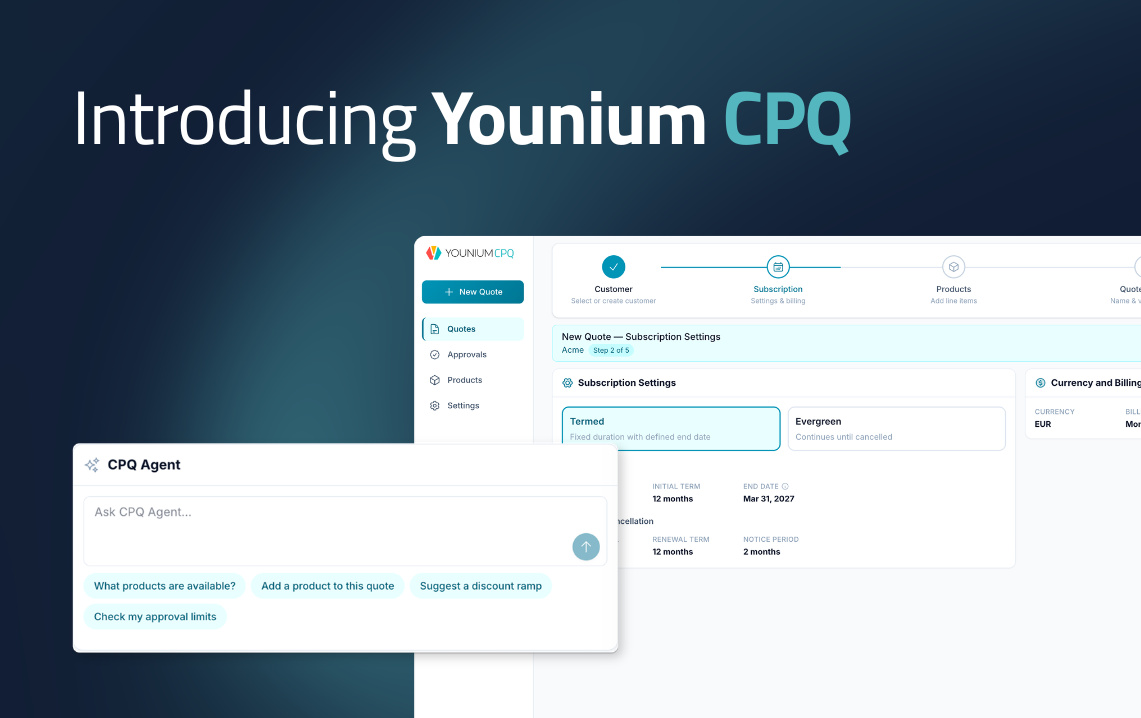
There’s also a CPQ Agent. It’s an AI-powered assistant that lets reps ask questions, add products, and build quotes conversationally, without manual searching or setup.
Automated Billing and Usage-Based Pricing
Younium is built for subscription billing at scale. It automates complex billing workflows that many CPQ tools can’t handle. You can expect:
- Support for fixed, tiered, and usage-based billing models
- Configurable billing frequency, alignment, and delay preferences
- Automated invoicing with correct line items, service periods, and pricing
- Proration support for mid-cycle changes, dunning, and payment collection
- Automated usage imports and calculations for usage-based billing
From credit notes to payment collection, Younium CPQ bases everything on the exact terms of the quote. This ensures that what is sold is always billed correctly.
From Quote to Subscription in One Click
One of Younium’s biggest advantages is how it handles the transition from sales to operations.
Once a quote is approved, it converts directly into an active subscription order. With no manual re-entry, there’s no data mismatch between what Sales agreed and what Finance bills.
Every pricing detail, contract term, and billing schedule flows through automatically. This tight connection reduces errors and significantly speeds up the quote-to-cash process. It’s also the handoff that disconnected CPQ tools consistently get wrong.
Revenue Recognition Built for Compliance
Unlike many CPQ solutions, Younium supports financial reporting and compliance out of the box.
It automates ASC 606 and IFRS 15-compliant revenue recognition at the line-item level, whether charges are monthly, upfront, or custom.
Every invoice, payment, and subscription revenue recognition event is automatically booked into segmented journal entries. This makes general ledger reconciliation and monthly close significantly faster.
A full quote-to-cash audit trail traces every financial transaction back to the originating quote. Quote tracking and versioning protect against audit risk and support clean handoffs to finance and ERP systems.
Real-Time Metrics and Financial Visibility
With Younium’s deep insights into subscription performance, teams can make better decisions. Its Subscription Insights module pulls from a single source of truth as quoting, billing, and subscription management live in one platform. With it, you can:
- Track key SaaS metrics like MRR, ARR, NRR, churn, and expansion revenue
- Use real-time data to monitor revenue growth and customer trends
- Support forecasting and strategic planning with reliable data
This gives finance and leadership teams full visibility into the business without manual data pulls or reconciliation across systems.
Designed for Scale and Global Operations
Younium is a multi-entity, multi-currency platform. Each entity books transactions in its base currency, with up-to-date exchange rates applied automatically.
While many CPQ tools help you close deals, Younium ensures those deals are billed, tracked, and reported correctly. Group-level financial reporting is available in real time; no consolidation work is needed.
Younium also supports integrations that offer the precision and scalability needed to grow without friction. It connects natively with Salesforce and HubSpot for CRM integration, and with NetSuite for ERP and financial data sync.
The NetSuite connector syncs journal entries, invoices, customers, products, and exchange rates with no custom code required.
Also Read:
- Younium CPQ: The Only CPQ Built as Part of the Revenue Engine
- Why Subscription Models and Reporting Metrics Are Important
CPQ vs Quote-to-Cash: What’s the Difference?
By now, you understand what CPQ is and how it supports the sales process. But there’s a bigger concept that often comes up alongside it: the quote-to-cash (Q2C) process.
Throughout this guide, we’ve referenced the quote-to-cash process several times. If you’ve been wondering exactly where CPQ ends and quote-to-cash begins, this section clears that up.
What CPQ Covers
Configure, Price, Quote (CPQ) focuses on the front end of the sales cycle — everything that happens before a deal is signed. Done well, it gets an accurate, approved quote in front of the customer quickly and without errors.
It helps sales teams:
- Configure products based on customer needs
- Apply pricing rules and pricing logic
- Generate accurate quotes quickly
In simple terms, CPQ tools are designed to help sales reps move from the initial customer inquiry to a signed deal. They improve sales efficiency, reduce pricing errors, and support faster sales cycles.
What Quote-to-Cash Covers
Quote-to-cash (Q2C) is the full revenue lifecycle. It starts where CPQ starts at the initial customer inquiry, product configuration, and creation of a quote. However, it doesn’t stop at the signature.
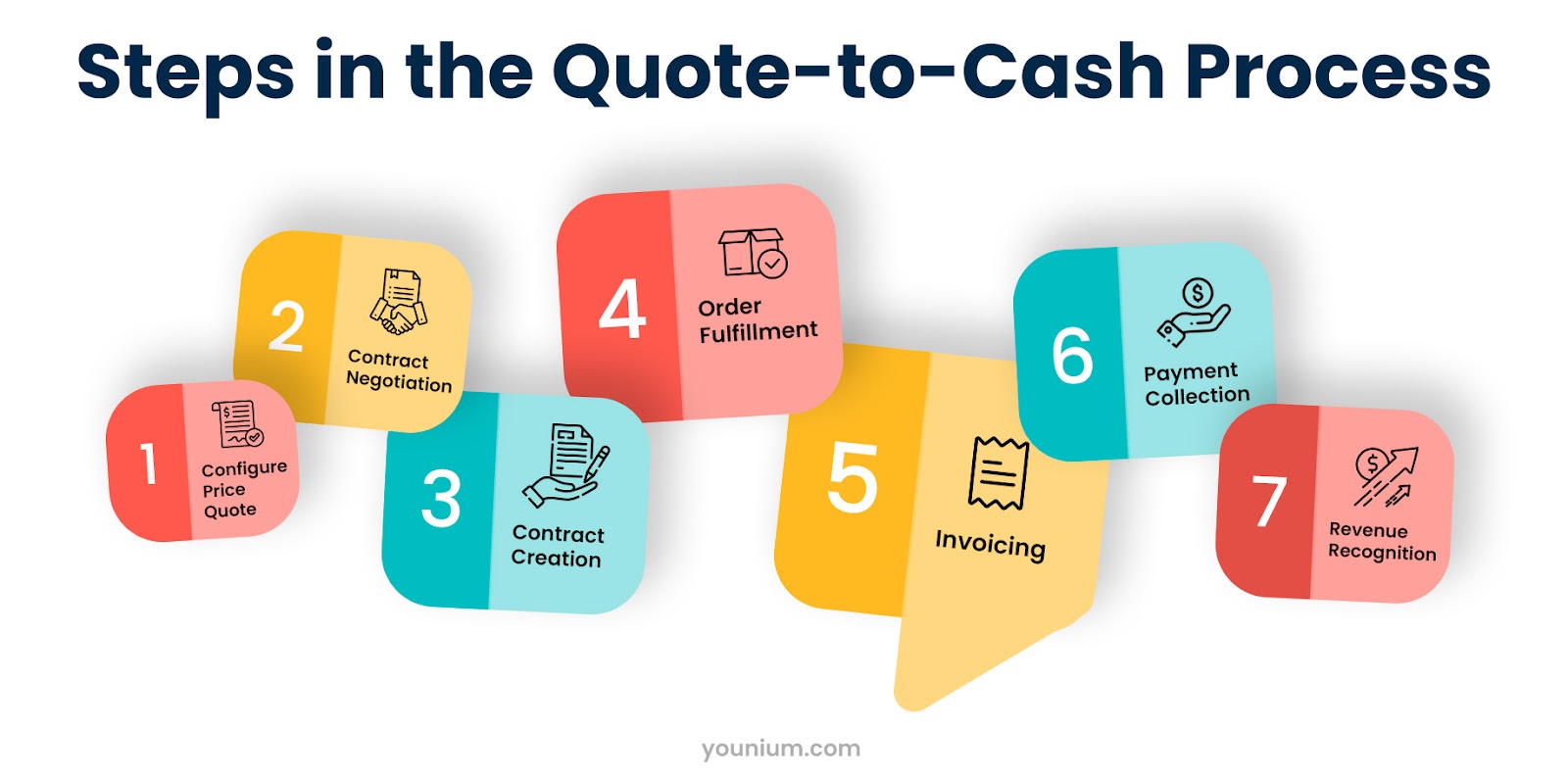
Instead, it includes everything that happens after the quote is created and accepted:
- Contract management
- Subscription activation
- Billing and invoicing
- Payment collection
- Revenue recognition
- Financial reporting
- Renewal
In other words, quote-to-cash connects sales, finance, and operations into one continuous workflow.
How CPQ and Q2C Differ
CPQ focuses on sales efficiency, while Q2C ensures operational accuracy and financial compliance.
Here’s a simple way to think about it. CPQ answers the question: How do we get the right quote to the right customer, fast?
Quote-to-cash answers a bigger question: How does that quote become predictable, recognised revenue — and how do we manage everything in between?
Here’s how they differ:
- Scope and Coverage: CPQ tools handle product setup, pricing logic, and quote generation. Q2C platforms go further. They manage billing schedules, usage-based fees, renewals, and subscription revenue recognition.
- System Integration: CPQ often integrates with CRM systems to pull customer data. Q2C platforms connect CRM, CPQ, billing systems, and ERP systems to ensure seamless data flow across departments.
- Lifecycle Management: CPQ ends at the signature. Q2C continues through subscription activation, mid-cycle changes, and contract amendments. It supports lifecycle quoting and billing without manual rework.
- Financial Visibility and Compliance: CPQ helps close deals faster. Q2C ensures those deals are billed, tracked, and reported correctly. It supports compliance, with audit trails and subscription metrics like MRR and ARR.
- Strategic Impact: CPQ accelerates sales and improves quote accuracy. Meanwhile, Q2C optimizes revenue growth, customer satisfaction, and operational scalability.
Also Read:
FAQ
1. What does CPQ stand for?
CPQ stands for Configure, Price, Quote. It refers to both a business process and the software that automates it.
The configure stage is about building the right product or service offering for a customer. The price stage applies the correct pricing rules automatically. The quote stage produces a professional, accurate proposal ready for approval and delivery.
2. What is the difference between CPQ and billing software?
CPQ manages the front end of the revenue process. This includes configuring products, applying pricing logic, and generating quotes before a deal is signed.
Billing software manages what happens after, including invoicing, payment collection, and subscription management.
For subscription businesses, the two need to be directly connected. A gap between them is exactly where pricing errors and revenue leakage tend to hide.
3. How does Younium support CPQ and the Q2C process?
Younium supports CPQ by connecting quoting directly to subscription management, billing systems, and financial reporting. Sales teams can generate accurate quotes, then convert them into active subscriptions without manual re-entry.
From there, Younium handles invoicing, usage-based billing and revenue recognition. This ensures the entire quote-to-cash process runs smoothly without pricing errors.
4. What are the main benefits of CPQ for B2B SaaS companies?
The core benefits are speed, accuracy, and consistency. CPQ software enables sales teams to:
- Generate accurate quotes in minutes rather than hours
- Eliminate pricing errors caused by manual calculations
- Enforce pricing rules and discount controls across every deal
For subscription businesses, it also reduces revenue leakage by ensuring the terms in every quote feed directly into billing and subscription management.
5. How does CPQ software integrate with CRM and ERP systems?
CPQ integration with CRM systems like Salesforce or HubSpot lets you build and send quotes directly from the tools you already use.
Integration with ERP systems ensures that once a deal closes, order and contract data flows into financial and fulfillment systems. There’s no need for manual re-entry as customer data is pulled in automatically.
Together, these integrations remove the data silos that slow down the entire sales process.
6. Is CPQ software only for large enterprises?
No, and this is a common misconception. Yes, CPQ was historically associated with large enterprise sales teams. However, modern CPQ solutions are well within reach for growing B2B SaaS companies.
If your sales reps are managing custom deals, multi-product configurations, or complex pricing models, CPQ adds real value regardless of company size. The right platform scales with you rather than requiring a major implementation to get started.
7. Do subscription businesses need CPQ or a full quote-to-cash platform?
Most early-stage subscription businesses can start with CPQ and get real value from it. But as pricing models grow more complex and deal volume increases, the limitations of standalone CPQ become harder to ignore.
A full Q2C platform connects quoting to billing, revenue recognition, and subscription management in one system. It eliminates the manual work and data gaps that CPQ alone can’t solve.
Also Read:
- From CRM to Revenue Management: Salesforce vs. Younium for B2B SaaS
- How to Ace Subscription Management and Revenue Forecasting
Ready to Scale Your Subscription Business?
Understanding what CPQ is is just the starting point. The real value comes from how it fits into your broader revenue operations.
To build a scalable sales and revenue engine, you need more than quoting speed. Quoting precision, billing accuracy, and financial visibility must also come into play. Here’s what matters most:
- Connect quoting to billing and reporting
- Automate subscription lifecycle changes
- Ensure compliance with ASC 606 / IFRS 15
- Track MRR, ARR, and renewal metrics in real time
- Eliminate manual rework and revenue leakage
Investing in a full quote-to-cash platform guarantees a reliable CPQ process plus a complete revenue system.
Ready to go beyond quoting and scale your revenue engine? Book a demo to explore how Younium can help you manage pricing, billing, and subscriptions in one place.