Revenue Recognition
SaaS billing covers invoicing, payments, and revenue recognition. Understand how it works and apply best practices to grow revenue and prevent leakage.

Jump to read:
What is SaaS Billing?
How Does SaaS Billing Work?
SaaS Billing Models
Why Effective SaaS Billing Matters for B2B Companies
SaaS Billing Software: What It Does and How to Choose
9 SaaS Billing Best Practices
Frequently Asked Questions
Conclusion
|
Quick Summary:
|
SaaS billing involves charging customers for software on a recurring, usage-based, or hybrid basis. It's also called SaaS subscription billing or recurring billing. It covers the full revenue cycle. It runs from invoicing and payment collection to revenue recognition.
Losses in B2B SaaS billing have various causes. This includes missed renewals, unbilled usage, failed payments, and contract terms that never reach the invoice.
Each gap may seem small, but together they determine whether your reported revenue will pass an audit or due diligence review.
This guide explains how SaaS billing works. We’ll also discuss the main billing models and provide best practices that keep revenue accurate.
What is SaaS Billing?
SaaS billing is the process of charging customers for subscription software. It's not like traditional one-off sales. This recurring revenue cycle covers pricing setup and payment collection. It also includes upgrades, proration, and revenue recognition.
Because it’s an automated billing system, accuracy is crucial. Even just one pricing error can replicate across thousands of renewals. This quietly damages customer satisfaction and bottom lines.
When managing subscriptions, you must consider dynamic customer behavior. Users upgrade mid-term, downgrade at renewal, add seats, pause, or churn altogether.
Each event triggers complex calculations. This includes automated proration, revised invoices, and credit notes.
A working SaaS billing setup has five moving parts:
- Pricing Catalog: Establishes what you sell and your pricing plans
- Metering: Tracks and records actual user activity
- Rating: Translates that activity into specific charges while applying discounts and proration
- Invoicing and Collections: Handles the actual movement of money
- Revenue Recognition: Ensures accurate and compliant revenue reporting
Weakness in one aspect leads to disputed renewals and invoice errors. Your SaaS business must treat the whole chain as one connected billing system, not five separate tools.
|
What Is SaaS Billing? SaaS billing is a continuous, recurring revenue cycle. It automates pricing, billing scenarios, and revenue recognition across the entire revenue lifecycle. Accuracy is a must because a single error can ripple across thousands of automated renewals. |
SaaS Billing vs Traditional Billing
There are three ways that SaaS billing differs from traditional billing: what triggers a charge, how often, and who carries the risk. B2B SaaS billing runs on contracts that change continuously. This is precisely where legacy billing systems strain.
The table below shows how these billing systems compare.
| Feature | Traditional | SaaS |
| Payment Trigger | When goods are shipped, or work is finished | Regularly (by month, year, quarter, or usage) |
| Frequency | One-off, per order | Automatically repeats every cycle |
| Pricing Style | Fixed price per transaction | Flexible pricing models, including tiered, per-seat, usage-based, or hybrid |
| Revenue Recognition | Recognized largely at the point of sale | Spread out over the subscription period |
| Customer Churn Exposure | Low (the sale is already done) | High (they can quit at any renewal) |
Also Read:
- What Is Subscription Billing? A Guide for SaaS Businesses
- What Is Subscription Management? A Guide for B2B Businesses
How Does SaaS Billing Work?
SaaS billing is a seven-step cycle that repeats at the start of each billing period. It begins with a plan and a contract setup. Then, it moves through subscription capture, usage metering, rating, and proration.
It then ends with invoice generation, payment collection, and revenue recognition. Each step must hand clean data to the next.
Here are the seven steps involved in SaaS billing. Two set up the contract, and five repeat every cycle:
- Plan and Contract Setup: Configure products, price books, billing frequencies, and contract terms in your SaaS billing system.
- Subscription Capture: A signed quote becomes an active subscription. It flows from your quote-to-cash software into billing without manual intervention.
- Usage Metering: Automatically count how many seats, transactions, or API calls a customer uses. Then, check those numbers against what their contract allows.
- Rating, Charges, and Proration: Apply prices to usage and plan changes. For accurate billing, prorate mid-term upgrades and downgrades to the day.
- Invoice Generation: Create and send accurate invoices. Ensure that line items, currency, and tax compliance are correct. US sales tax laws treat SaaS differently from state to state.
- Payment Collection: Collect payment against each invoice. For smooth SaaS billing, offer many payment methods. When invoices are late, automated reminders and quick follow-ups help resolve payment failures. They also recover payments before service is finally cut off.
- Revenue Recognition and Reporting: Count revenue as services are delivered, not when cash arrives. Revenue operations reconciles your billed, collected, and recognized amounts to measure revenue growth.
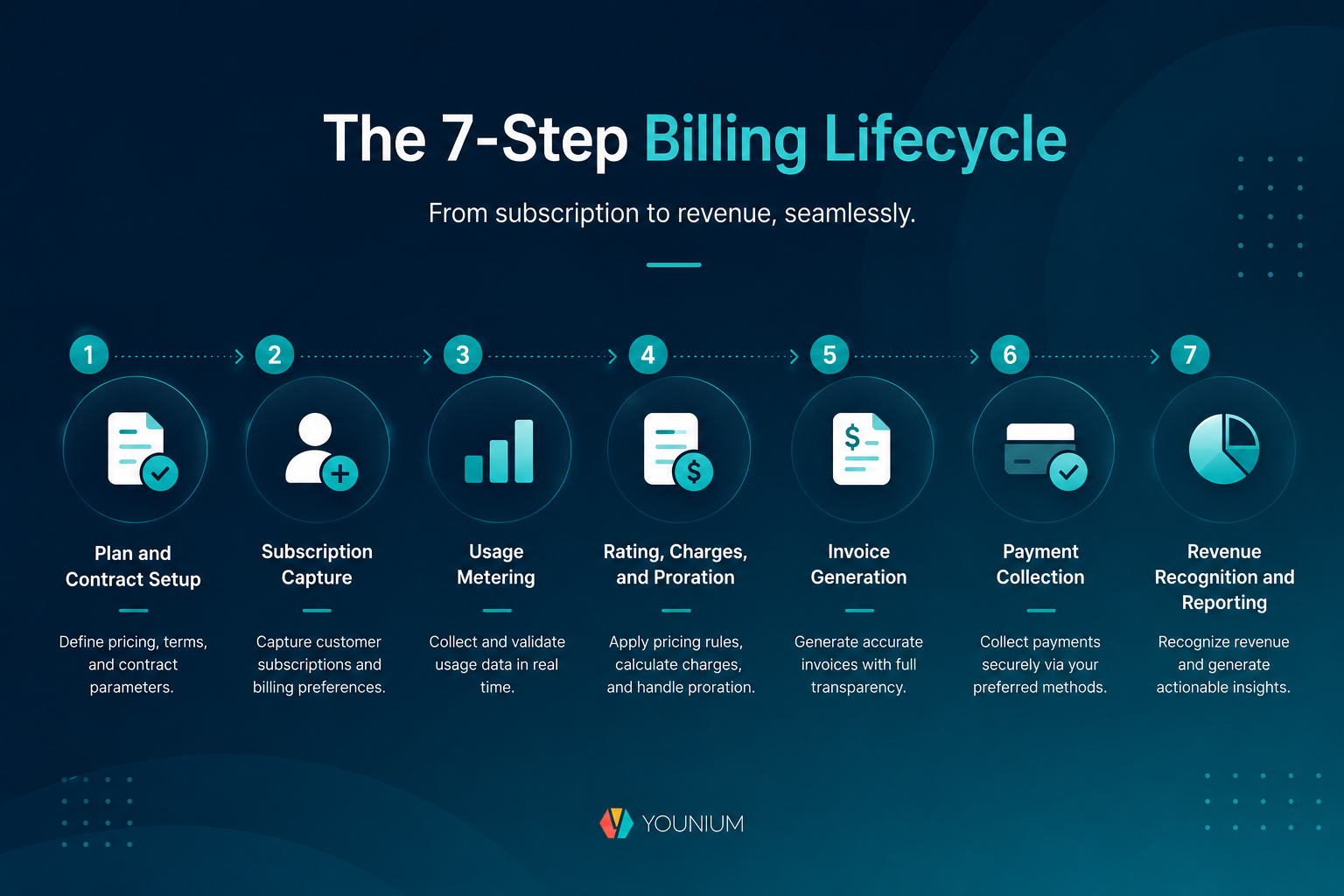
The SaaS Billing Lifecycle: From Quote to Cash
The SaaS billing lifecycle runs from signed quote to recognized cash. Everything depends entirely on the client's contract. Every charge, plan change, or renewal must match those contract terms.
Problems arise when your sales software, billing solution, and accounting tools don't communicate. For example, a salesperson might close an upgrade that doesn’t reach billing. Finance then spends a month-end reconciling three systems instead of closing the books.
A single source of truth brings order back to your team. The contract feeds billing, billing feeds the ledger, and every number matches perfectly.
Revenue Recognition and Compliance (ASC 606 / IFRS 15)
Two main rules control revenue recognition: ASC 606 (US) and IFRS 15 (global). For both, you must recognize revenue as services are delivered, not when you invoice or collect cash.
For SaaS, that means spreading subscription revenue over the contract term and deferring the rest. Deferred revenue is cash invoiced but not yet earned. Recognized revenue is the portion already delivered.
Billing records control these numbers. That’s why SaaS revenue recognition and invoicing belong in the same system. This creates a clear paper trail from your accounting books to customer contracts.
If your recorded revenue is inaccurate, you face a high risk of a SOX 404 restatement. Federal audit rules could force you to publicly correct and reissue your past financial statements.
To pass audits and avoid costly mistakes, billing and revenue recognition must share the same data.
|
What Are the Steps in the SaaS Billing Process? SaaS billing has seven steps. It includes initial contract setup, final payment processing, and compliance tracking. To avoid costly audits and the risk of SOX 404 restatement, billing and revenue recognition should use the exact same data. |
Also Read:
SaaS Billing Models
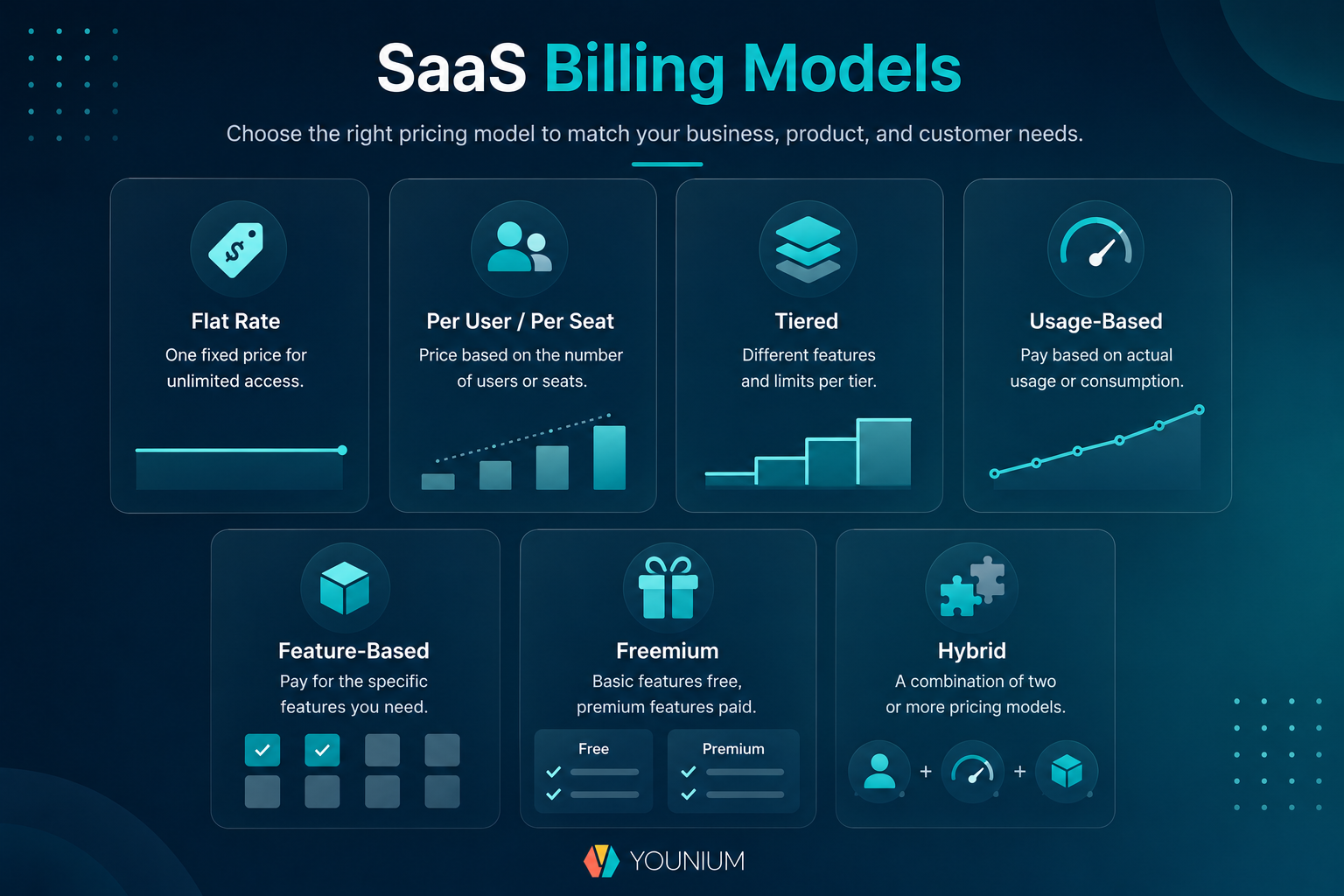
SaaS billing models dictate how a SaaS business charges customers. It could be a flat monthly fee, per-user or per-seat pricing, tiered package, or metered usage.
To cater to varying user needs, most B2B SaaS companies now combine two or more models rather than committing to one. According to ICONIQ’s 2026 State of GTM, 48% of companies use a hybrid billing model.
Most subscription pricing strategies build on the eight core models compared below.
| Model | How It Charges | Best For | B2B Example |
| Flat-Rate | One fixed price for full access | Single-product companies and simple plans | Basecamp (fixed price for unlimited users) |
| Per-User/Per-Seat | Price multiplied by licensed seats | Collaboration, CRM, and finance tools | Zoom (pay per seat) |
| Tiered | Set packages with varying feature limits | Segmented customer bases | HubSpot (Starter/Pro/Enterprise) |
| Usage-Based | Pay per unit consumed | Infrastructure and AI products | AWS (pay-as-you-go approach) |
| Feature-Based | Price locked behind modules or functionality | Modular platforms with add-ons | Intercom (Pro, Copilot, and Proactive Support Plus as add-ons) |
| Freemium | Free basic version with paid upgrades | Getting users to try before they buy | Slack (free core product, paid access to unlimited history and app integrations) |
| Hybrid | Base subscription fee plus usage costs | Growing companies with dynamic needs | Zapier (fixed tiers + task usage fees) |
Factors to Consider When Choosing the Right SaaS Billing Model
Choosing the best SaaS billing model for your business begins with understanding the value users get from your service. Work through these five factors before you commit.
- Value Metric: The charge unit should increase in line with customer value.
- Revenue Predictability vs Fairness: How much billing variability can your forecast and customers absorb?
- Cost-to-Serve and Margin: Price must scale with infrastructure, support, and compute costs.
- Go-to-Market Motion: Product-led companies usually choose freemium or usage-based models. Meanwhile, sales-led teams tend to use tiered plans and contracts.
- Forecasting and Revenue Recognition Impact: Variable charges complicate ARR reporting and revenue recognition.
AI is forcing the choice sooner. The 16th Annual Report by KeyBanc Capital Markets and Sapphire Ventures in 2025 shows that 67% of SaaS companies already monetize AI.
Computing costs are high and unpredictable. To give users price certainty, most founders are sticking to traditional subscription pricing.
Once the model is set up, decide on the pricing tiers for your subscriptions. Then, revisit this yearly as your value metric changes.
Also Read:
- The Future of SaaS Pricing: Finding the Right Model for Growth
- SaaS Subscription Pricing Strategies for Customer Success
Why Effective SaaS Billing Matters for B2B Companies
Effective SaaS billing helps B2B companies turn signed contracts into cash. It helps improve revenue capture, customer trust, finance efficiency, and pricing insight.
Revenue Management and Leakage Control
Billing accuracy is how you control revenue leakage. LeakShield’s 2026 guide shows that 3-9% of revenue is lost to leakage, and 38% is due to pricing errors.
Revenue leaks happen due to unbilled usage, payment failures, and permanent discounts. This wastes money that the sales team has already earned.
The fix to revenue leakage must be structural. You need a system where every contract term automatically flows right onto the invoice.
Customer Trust and Retention
Invoices are the most frequent touchpoint you have with customers after the deal closes. A wrong amount, a missing PO number, or an unexplained proration erodes trust faster than most product issues.
Clear and predictable invoices reduce billing disputes and improve retention.
Operational Efficiency
Manually inputting invoices drains hours that your finance team should spend on actual strategy. It also increases the risk of errors. This leads to late bills, customer arguments, and a stressful month-end close.
Great SaaS billing management replaces that monthly headache with automated rules that run on their own.
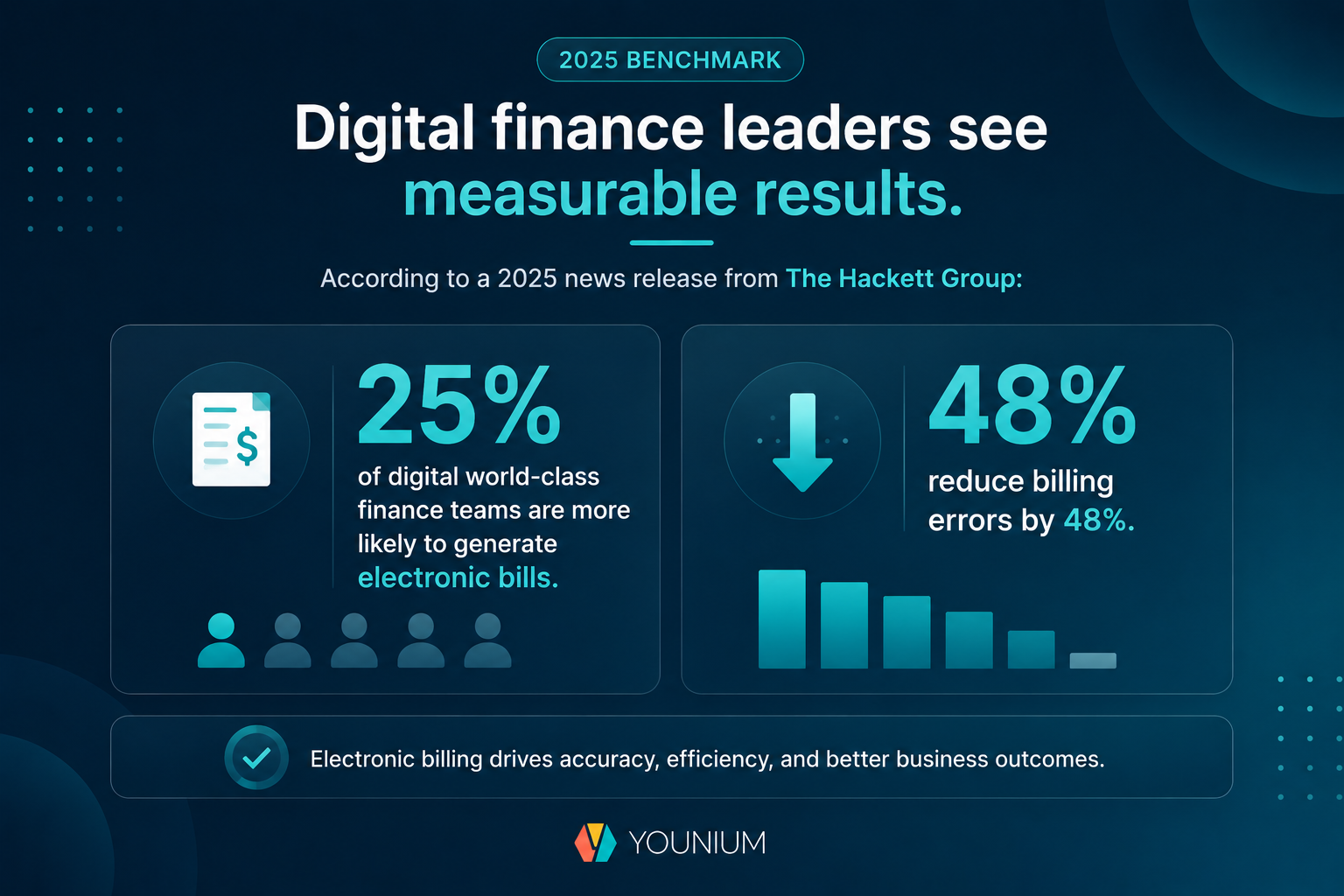
A 2025 news release from The Hackett Group found that 25% of digital finance teams are more likely to generate electronic bills. As a result, they reduce billing errors by 48%.
Data-Driven Pricing Decisions
Pricing decisions are only as strong as the data behind them. Your billing system is the source of key subscription growth metrics, such as:
- Monthly recurring revenue (MRR)
- Annual recurring revenue (ARR)
- Average revenue per account (ARPA)
- Churn rate
- Expansion revenue
It captures what customers actually pay, not what the price list says.
For example, Younium’s SaaS billing data dashboard shows key metrics like MRR, ARR, and more.
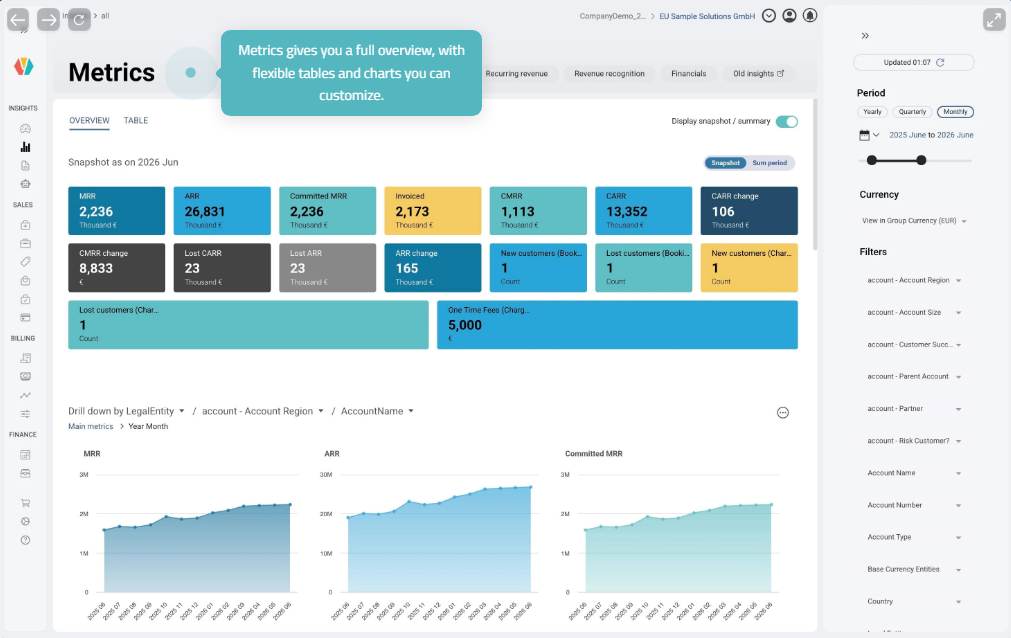
Image via Younium
When you have clean billing data, you can see which plans your customers love, where discounts hurt your profits, and how usage turns into cash.
You don’t have to guess. You get the necessary facts to fix your pricing and save upcoming renewals. You can also put together a forecast that your board will actually trust.
|
Why Is SaaS Billing Important? Effective SaaS billing secures revenue and protects customer trust. It automates pricing, renewals, and invoices. It also provides clean data for better pricing decisions and accurate forecasts. |
Also Read:
- What is a Good Churn Rate for SaaS Companies? Benchmarks
- Forecasting Subscription Revenue: How to Do It Right
SaaS Billing Software: What It Does and How to Choose
SaaS billing software automates the full contract-to-cash cycle for subscription businesses. It stores contract terms and calculates recurring and usage charges. Then, it issues invoices, collects payment, and posts results to your accounting stack.
It helps you bill every contract correctly, on time, and without manual rework.
In the finance stack, a SaaS billing system sits between your CRM and your general ledger. It connects sales to finance by automatically turning closed deals into clean financial records.
Clean data flows out to revenue recognition software and accounts receivable software. One connected system can streamline financial processes from quote to cash.
Here are the features you should watch out for:
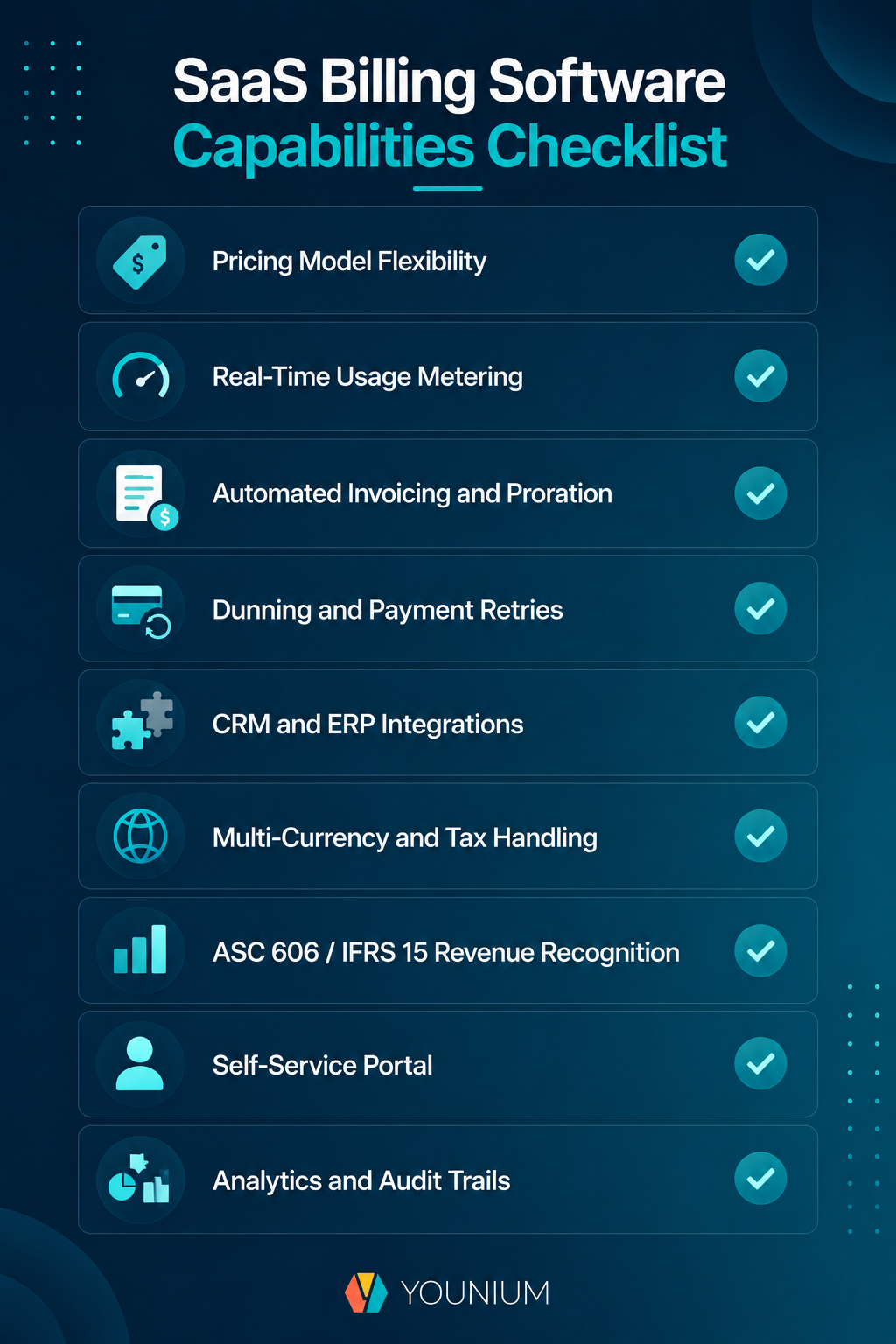
- Pricing Model Flexibility: Lets you mix and match flat rates, user seats, tiers, or usage metrics without custom code
- Real-Time Usage Metering: Records usage as it happens, so you don’t miss a billable activity
- Automated Invoicing and Proration: Handles mid-term upgrades, downgrades, and co-terminations without manual intervention
- Dunning and Payment Retries: Automatically recovers failed payments before they result in involuntary churn
- CRM and ERP Integrations: Keeps contract, invoice, and ledger data consistent across every tool you use
- Multi-Currency and Tax Handling: Bills customers correctly across entities, currencies, and tax regimes
- ASC 606 / IFRS 15 Revenue Recognition: Schedules revenue as you deliver, not as you invoice
- Self-Service Portal: Lets customers view invoices, update payment details, and manage plans
- Analytics and Audit Trails: Allows you to log every change, report on every metric, and accelerate every audit
Here’s how to choose a SaaS billing software that scales with you:
- Define Your Billing Needs: List pricing models, billing frequencies, currencies, and contract volumes before reviewing any SaaS billing tools.
- Match Your Pricing Models: Confirm that it handles your tier, seat, and usage logic without workarounds.
- Check Integrations: Your CRM, ERP, and payment providers must connect without custom middleware.
- Plan for Scale and Compliance: Choose a SaaS billing platform that can add entities and currencies and provide audit-ready revenue recognition.
- Test with Real Contract Data: Run your messiest live contracts through the trial because demo data always behaves.
An end-to-end platform like Younium works best for B2B companies managing multiple contracts, currencies, and revenue recognition rules. Choose a simple billing tool if you only sell one product on a single plan.
Signs You Have Outgrown Manual Billing
Billing using spreadsheets fails in certain stages. It starts with version confusion: you have multiple owners and too many tabs. This leaves you unsure of what each customer actually owes.
Then, you miss renewals because formulas don’t chase an anniversary date. Unbilled usage builds quietly because consumption data lives in the product, not the workbook.
Audit season exposes the rest. It leaves you without change logs, approval trails, or clean records. Most companies only switch to dedicated billing software after a missed renewal costs them serious money.
If your month-end close feels this stressful, it's time to switch before your next renewal cycle.
|
Why Do You Need SaaS Billing Software? SaaS billing software automates the full contract-to-cash cycle. A scalable system must handle your pricing, usage tracking, automatic proration, and compliance. If spreadsheet billing is causing version confusion, missed renewals, or frantic month-end closes, we recommend moving to a dedicated subscription platform before your next renewal cycle. |
Also Read:
9 SaaS Billing Best Practices
Strong SaaS billing best practices prevent revenue loss and eliminate manual corrections. It automates everything from pricing to compliance. The nine practices below establish a scalable foundation for continuous growth.
1. Set Clear and Transparent Pricing
Publish complete, honest pricing so customers always know what they’ll pay and why. Your pricing page should state what each plan includes, which charges recur, and which are one-off.
Remove hidden fees. Implementation, support tiers, and overage charges belong on the quote, not in the small print.
Put your price-change policy in writing, along with notice periods, so renewals never surprise anyone. Transparent pricing shortens sales cycles and reduces disputes that delay payment.
In B2B, some pricing stays behind a quote, and that’s fine. Give the customer an indicative range early on. Then, confirm the exact figure once the scope is clear. The surprises that erode trust come at renewal, not at the first quote.
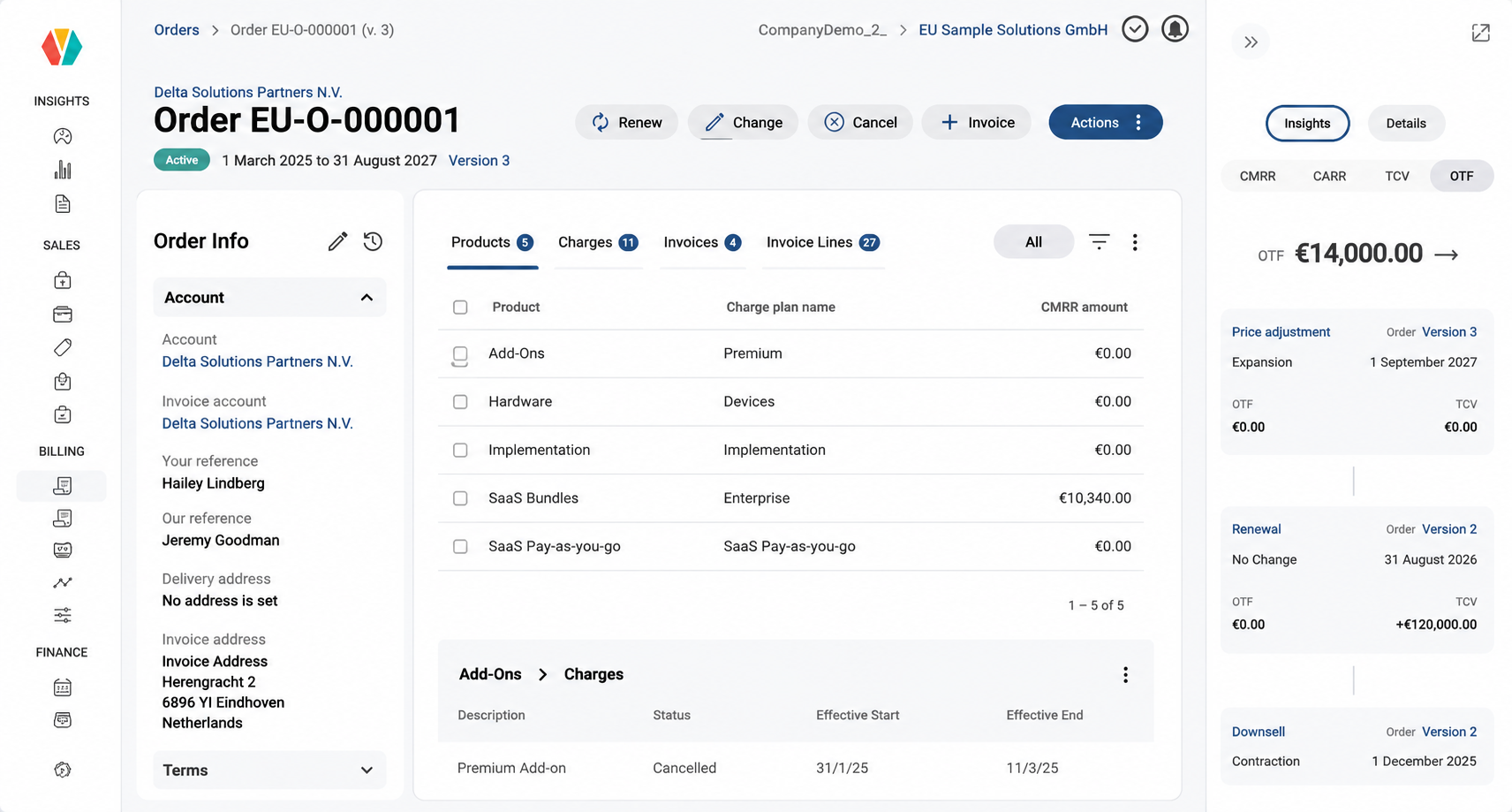
Image via Younium
2. Automate Invoicing, Proration, and Reminders
Automate invoice generation, proration, and payment reminders. This way, you’re never behind on billing. Scheduled invoice runs pull contract terms, usage data, and tax rules into accurate invoices on the agreed date.
Proration rules should handle mid-term upgrades and downgrades automatically. Each customer is charged only for what they consumed.
For late invoices, set a reminder sequence with sensible spacing rather than a single email. Send notices before each charge so customers can plan the payment in advance.
Group charges into one clean invoice per legal entity. A single, readable invoice is often approved faster. Tie every charge back to a contract reference so questions are resolved in minutes.
3. Meter Usage Accurately in Real Time
Define every billable metric clearly. Track it in real time so invoices match actual use. Make sure your product, finance, and contract teams have the same definition of "usage".
Track usage directly at the source. Look for unique events to prevent duplicate bills. Check your metered volumes before sending invoices to prevent errors. Small mistakes add up to massive revenue losses.
Give customers a live dashboard to check their usage before the bill arrives. This stops disputes and keeps customers happy. Finally, archive the raw data so you can easily verify any number during an audit.
4. Offer Flexible Contracts and Billing Terms
Support mid-term changes, co-terming, and unified invoicing for smooth billing. Customers expect to add products mid-cycle, align their renewal dates, and get a single invoice.
Meeting the demand for shorter, flexible contracts directly improves subscription renewal rates.
Capture every contract modification with a clear record of the change type, effective date, and approval trail. This automated history accurately drives the next invoice. This way, mid-term revenue never slips through.
5. Reduce Involuntary Churn at the Payment Step
Advanced B2B SaaS companies bill by invoice and collect by bank transfer. Cash depends on disciplined accounts receivable, not card retries.
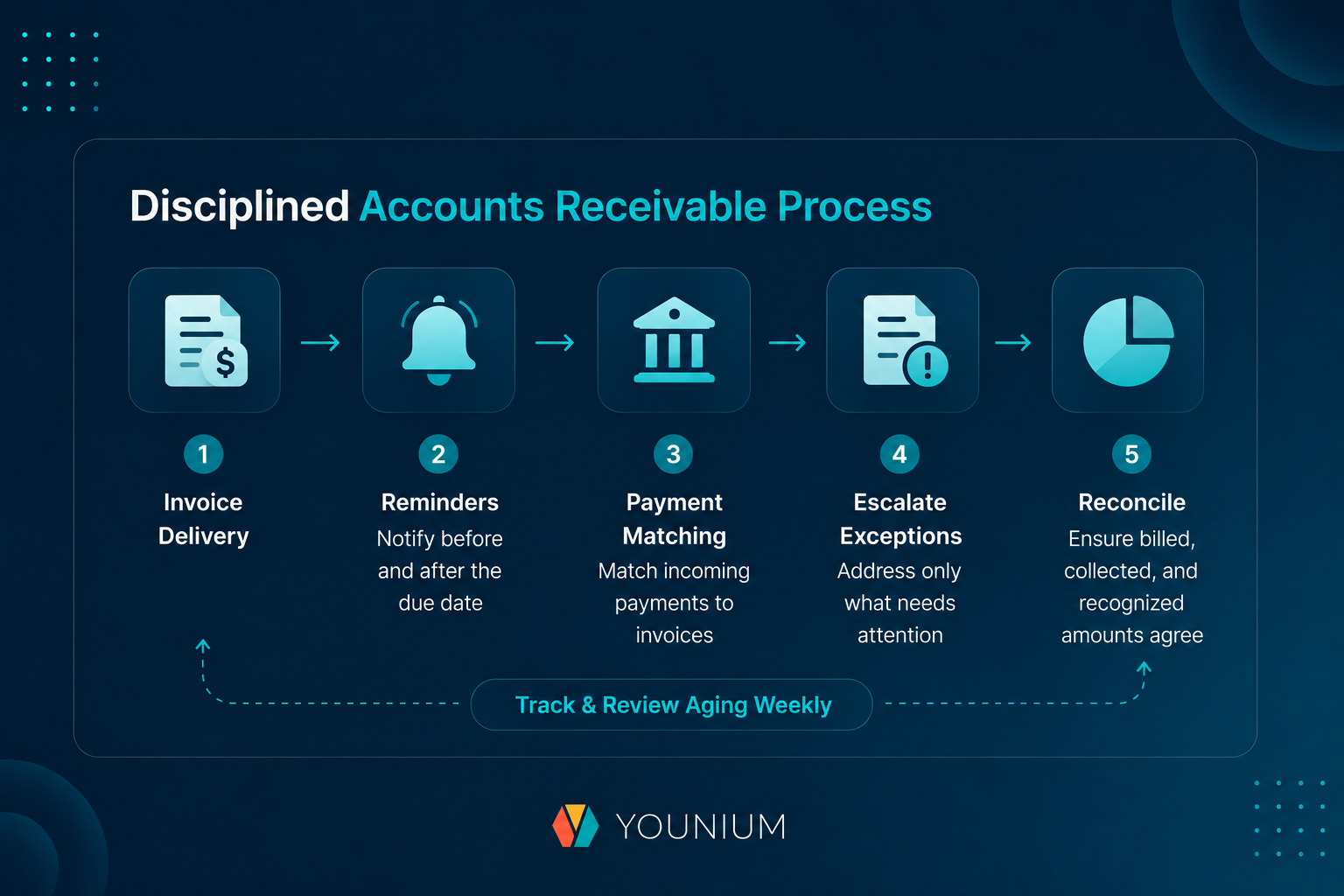
Set clear payment terms, send reminders before and after the due date, and track every overdue invoice by age.
The payoff is measurable. According to Hackett Group research, top finance teams achieve 48% lower days' sales outstanding (DSO). They also see 83% lower average days delinquent and collect nearly 100% of their payments on time.
Automate the routine. Schedule invoice delivery, match incoming payments to invoices, and escalate only the exceptions.
Pair collections with reconciliation, so billed, collected, and recognized amounts always agree.
Assign a clear owner for every overdue account, and review aging weekly. Collecting cash on time eliminates the need to follow up with customers for overdue payments.
Also Read:
6. Use Billing Data to Drive Pricing and Retention
Let your billing system be the source of truth for ARR, MRR, churn, and expansion. Use actual invoice data instead of rough CRM guesses. This way, nobody argues over the numbers at quarter-end.
SaaS Capital's 2025 data shows that increasing your net revenue retention (NRR) from 90-100% into the 100-110% range adds about five points to your growth rate. Real numbers like these give you forecasts your board will actually trust.
Keep your books clean. Match up what you bill, collect, and book as revenue on a regular schedule.
Every quarter, take a hard look at your pricing alongside your win rates and deal sizes. Making small, steady tweaks adds up quickly over time. However, this time, the cash stays in your bank account.
Finally, look at segments and cohorts instead of big averages. Churn and expansion patterns hide in the details. Use those insights to fuel your next pricing update.
7. Stay Compliant with ASC 606 and IFRS 15
Keep billing and revenue recognition synchronized, so every invoice maps to compliant ASC 606 and IFRS 15 treatment. Each contract change, credit note, and adjustment should leave an audit trail that your auditors can easily follow.
Deferred revenue schedules should update automatically when contracts change, not at quarter-end through spreadsheets. Sharing one data model for billing and revenue recognition simplifies audit prep and lowers financial risk.
Keep one canonical contract ID across billing and revenue. Both teams then mean the same deal. When a credit or amendment is large, have finance and revenue sign off together.
8. Support Multi-Currency Payments and Local Tax Rules
Bill customers in their own currency. Apply each market's tax rules correctly from the first invoice. Europe set the direction by adopting its VAT in the Digital Age (ViDA) package on March 11, 2025.
Member states can now mandate domestic e-invoicing. Structured e-invoicing becomes mandatory for intra-EU B2B transactions from July 1, 2030.
The EU projects up to €11 billion a year less VAT fraud. It also expects around €4.1 billion a year in lower compliance costs.
For international B2B SaaS, multi-entity and multi-currency billing are now a must. Map each invoice to the right legal entity and bank account. Then consolidate all currencies into a single view for the board.
Set your group reporting currency and rate source early. Rollups then run cleanly without weekly manual fixes at close.
9. Communicate Billing Changes Transparently
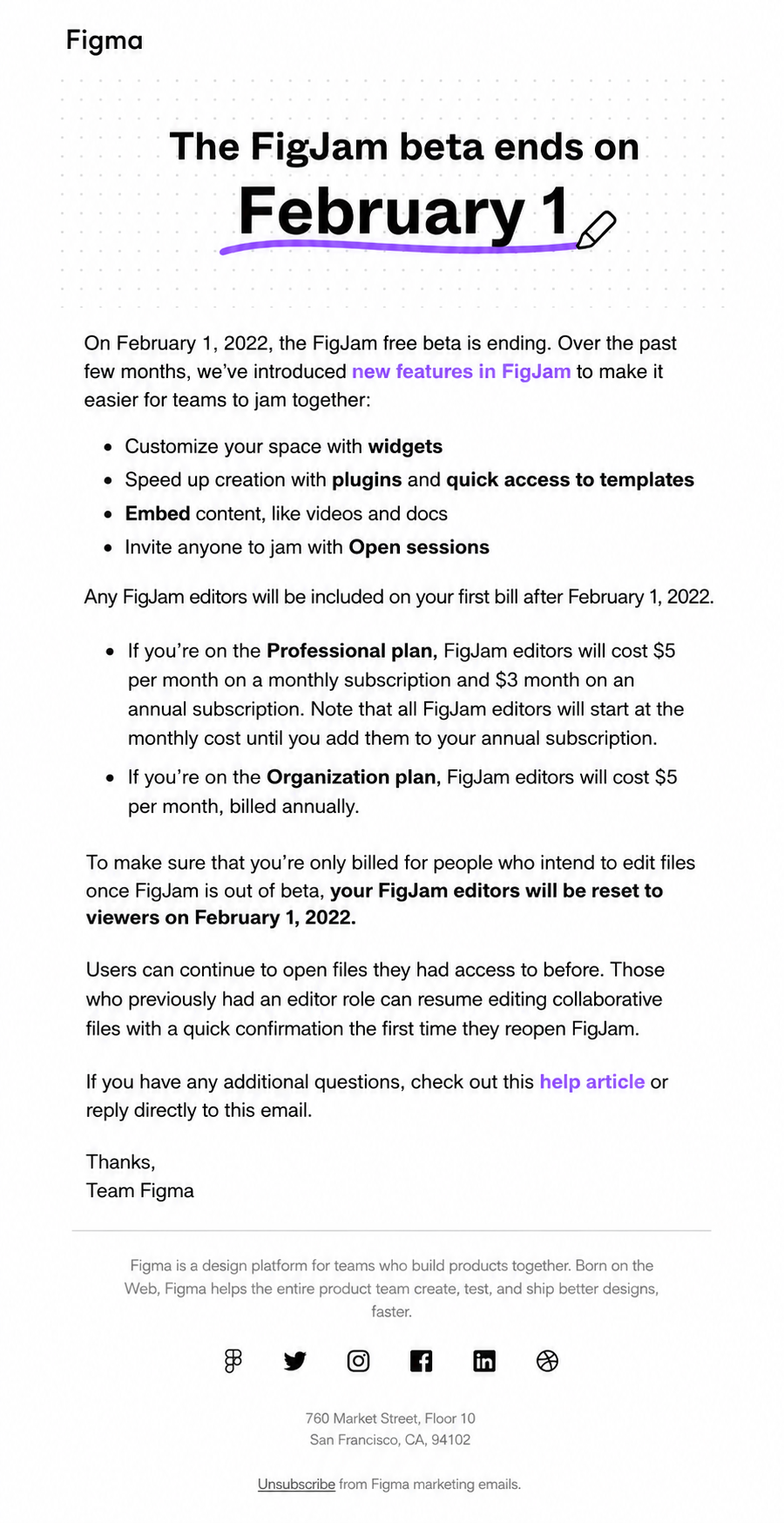
Tell customers about billing changes before the invoice does. Price increases require written notice within the contractual window.
State the new amount and effective date plainly, as shown in the example email below from Figma:
Send usage alerts before customers cross an overage threshold, not after the charge lands. Surprise overages turn consumption pricing into churn.
Give customers self-service options to view invoices, change plans, and update payment details. Send renewal reminders before auto-renewal dates. This reduces the risk of disputes.
|
What Are the Best Practices for SaaS Billing? SaaS billing best practices build a reliable foundation by automating everything. Automated reminders and multi-currency compliance help you get paid on time without manual errors. Mastering these steps turns your billing into an accurate system of record. This protects revenue and supports predictable growth. |
Frequently Asked Questions
1. What is the difference between SaaS billing and subscription billing?
SaaS subscription billing is the recurring-charge engine. Meanwhile, SaaS billing is the broader process that software companies run on top of it. That process includes usage metering, proration, tax, collections, and revenue recognition. The two terms overlap in everyday use, but the distinction matters when you scope software requirements.
2. What is the difference between billing and invoicing?
Invoicing is the process of generating and delivering a bill. Billing is the wider process of charging, collecting, and recognizing revenue. A perfect invoice can still sit inside a broken billing process.
3. Why is SaaS billing so complex?
What makes SaaS billing complex is the constantly changing contracts. Mid-month upgrades require proration, usage fluctuates daily, and customers want to pay in different currencies. Every change has to hit your revenue recognition books without manual data entry.
4. Should you bill SaaS customers monthly or annually?
Annual plans usually retain revenue better. Meanwhile, monthly options make it easier for new customers to say yes. ChartMogul data shows that mid-market companies see about 88% net revenue retention on annual plans, compared to just 76% for monthly ones. You have to balance cash upfront against how easy it is to close the deal.
5. How does proration work in SaaS billing?
Proration charges customers only for the portion of the billing cycle during which a plan was active. On a mid-cycle upgrade, the system credits unused time on the old plan. It then bills the remainder at the new rate.
6. What is dunning in SaaS billing?
Dunning handles failed payments before a subscription gets canceled. It automatically resends the bill and emails the customer over the next few days. This step keeps you from losing customers to basic payment errors.
7. How do you automate subscription billing?
Automated subscription billing by linking rules directly to the contract. Schedules, proration, payment retries, and ledger syncing run from one central spot. Your team should only step in for rare exceptions, not routine invoicing.
8. How do you automate usage-based billing?
Automate usage-based billing by metering product events. Rate them against the customer's plan, and generate invoices automatically. Reconciliation checks should compare metered totals with billed totals each period. Any gap means there’s revenue leakage to investigate.
9. What are the key components of a SaaS billing system?
A SaaS billing system handles pricing, metering, rating, invoicing, payments, collections, revenue recognition, and analytics. When one component is weak, it corrupts everything that follows. Good systems leave clear audit trails. This way, finance can track every charge back to its contract.
10. How is SaaS billing calculated?
SaaS billing is calculated based on the plan price plus seats or usage at their respective rates. It then subtracts credits and proration, and adds tax. If the invoice and contract disagree, the contract wins.
11. How does SaaS billing handle taxes and multi-currency payments?
SaaS billing handles taxes using tax engines. They apply the correct rate for each jurisdiction. Currency conversions occur at invoice time. EU e-invoicing rules are tightening. Group reporting should still consolidate all entities and currencies into a single view for the board.
12. How does SaaS billing relate to revenue recognition under ASC 606 and IFRS 15?
SaaS billing feeds revenue recognition by turning each billing event into a deferred revenue schedule. Under ASC 606 and IFRS 15, revenue is recognized upon delivery of the service, not upon cash collection. An annual invoice is recognized month by month over the term.
13. How is AI changing SaaS billing?
AI is changing SaaS billing by introducing new value units that systems must meter and price. Roughly two-thirds of SaaS companies already monetize AI, per a survey by KeyBanc and Sapphire Ventures. B2B companies are starting to charge based on usage and results.
Conclusion
SaaS billing is the end-to-end process of charging customers for software. Pricing, metering, invoicing, collection, and revenue recognition operate as one system.
We’ve covered how that process works, the pricing models it must support, and the practices that keep it accurate. All three eventually get tested for diligence.
Your business model drives growth, your system ensures accuracy, and your discipline protects your revenue. Because billing turns contracts into actual cash, it deserves the exact same focus and seriousness as closing a deal.
If you’d like to test that against your own contracts, book a Younium demo. We’ll walk through them with you.
What's the biggest headache your finance team faces during month-end close? Let us know in the comments below!